Bad debt refers to the loss a business incurs when a customer fails to repay the credit extended to them. This can happen due to the customer’s bankruptcy, financial issues, or prolonged non-payment.
How to Record Bad Debts in Output Books
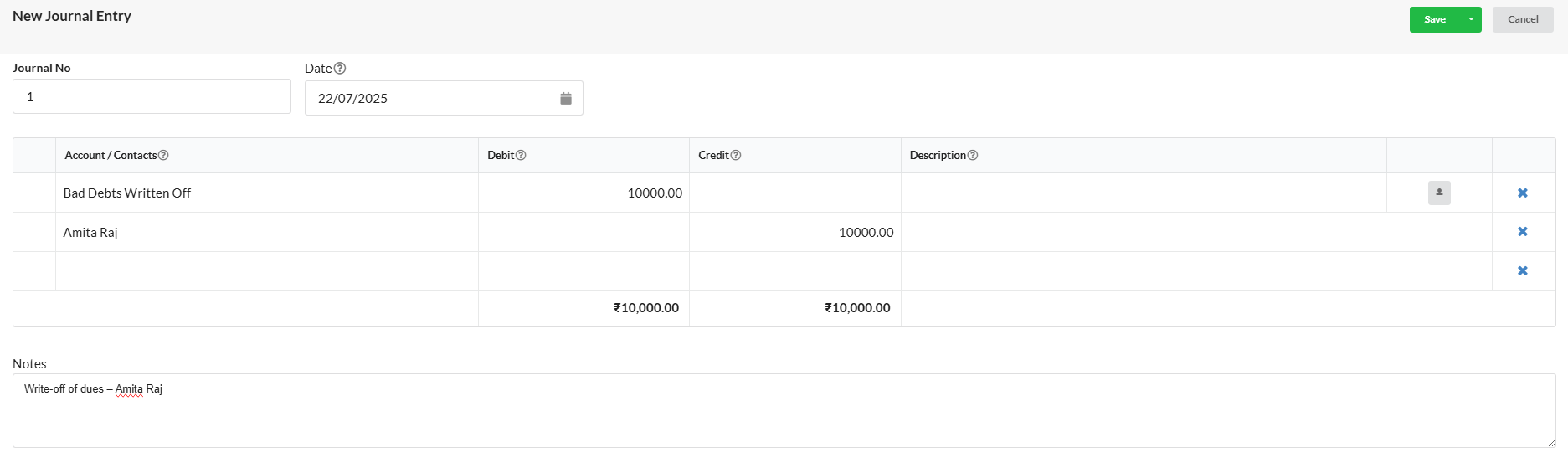
Scenario: Amita Raj was invoiced Rs. 10,000 on credit on 1st April 2025. On 22nd July 2025, the business determined that the debt is unrecoverable and needs to record it as a bad debt.
Steps to Record the Bad Debt
- Go to Accounting > Journal Entry > New Journal from the left-hand panel.
- In the first line:
- Select Bad Debts Written Off from the Account dropdown.
- Enter the amount (Rs. 10,000) in the Debit column.
- In the second line:
- Select Sundry Debtors from the Account dropdown.
- From the Contact dropdown, choose the corresponding debtor, e.g., Amita Raj.
- Enter the same amount (Rs. 10,000) in the Credit column.
- Add any Notes for future reference.
- Click Save to post the journal entry.